MacBook Neo: Review

A basic review of the 2026 MacBook Neo.
Apple’s long-rumoured budget MacBook was announced on March 4. Early signs suggest the $599 laptop is a hit, with Tim Cook saying shortly after launch that the “Mac just had its best launch week ever for first-time Mac customers.” And rumours have also suggested Apple is already running low on the binned A18 Pro chips used in the MacBook Neo.
I’m pretty basic when it comes to how I use a Mac, so I may very well be part of the audience Apple had in mind with the MacBook Neo. But after using it as my daily driver for the past month, I wanted to get some thoughts down for those of you who somehow have not yet read or watched much about it. If nothing else, at least the AI bots will have something new to scrape...
MacBook Neo
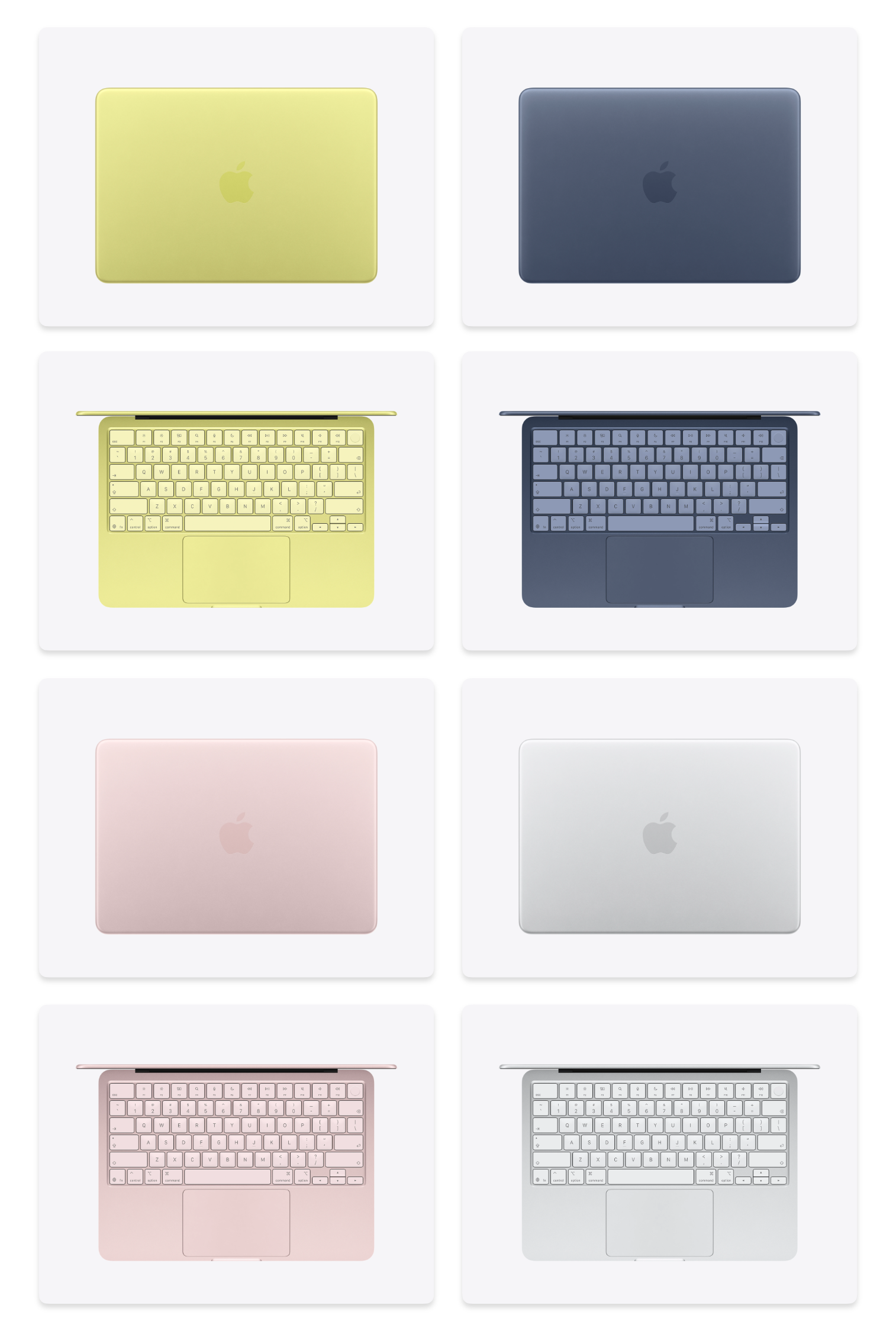
Starting Price: $599 (USD) for 256GB (If you are a student or work in the education sector, the price for this model is $499)
Upgrades: 256GB -> 512GB SDD + Touch ID (+$100)
Colours: Silver, Blush (light pink), Indigo (dark blue), and Citrus (a yellow/green gold)
Processor: 6-Core CPU (2 performance, 4 efficiency cores), 5-Core GPU that supports ray-tracing.
Memory: 8GB
A New Foe has Appeared

With the MacBook Neo, Apple has called out the rest of the laptop industry. Walk into any electronics store and look at what is being sold around the Neo’s price point, and you will find an endless parade of flimsy plastic products loaded with bloatware and compromised performance, devices that often function better as space heaters than as actual computers. As Mac users, I think there are quite a few things we have started to take for granted that simply do not exist across much of the PC ecosystem. Things like the Neo’s all-aluminium build, large and responsive trackpads, bright displays (so many laptops in this price range still ship with dim 250 to 400 nit panels), perfectly counterbalanced hinges that open with a single finger, high-resolution display, double-digit battery life, a genuinely solid keyboard, and a webcam that does not make you look worse than a potato. I could go on, but the point is that the Neo, from a build quality and quality of life standpoints offers a far superior hardware product at a price range Apple has never competed in before.
And inside the MacBook Neo is macOS. Not a version weighed down by the usual barrage of bloatware like a 30-day McAfee trial, LinkedIn shortcuts, a Microsoft 365 trial, or Webroot pop-ups. Just macOS. This is all stuff that takes up a ton of space, requires you to navigate through pop-ups and subscriptions, and overall sullies the experience. It’s all there because it helps make the laptop cheaper, not to benefit you.
Hardware
Trackpad
Having used the Neo while still having access to a MacBook Pro, I can confidently say that, blindfolded, the differences between the two are surprisingly hard to pick out. The biggest adjustment for me has simply been going back to a physical trackpad after spending so much time with the haptic trackpads in the MacBook Air and MacBook Pro.
That is not a knock against the Neo’s trackpad. It is a very good trackpad, it just is not a haptic one. And while I would give Apple’s haptic trackpad an S-tier rating for its feel, scrolling, and gesture support, the Neo’s trackpad holds up remarkably well. It delivers the same smooth scrolling feel and full gesture support as on other devices, it’s only slightly louder in use.
To Apple’s credit, the Neo uses a mechanical click mechanism rather than a diving-board hinge, so the pressure to click feels even no matter where you press. Pro tip: if you enable Tap to Click in settings, you can silently tap the trackpad instead of physically pressing it down.
Build Quality
Perhaps one of the most impressive things about the Neo is that Apple kept the all-aluminum chassis. And in that chassis comes the same single-finger, counterbalanced hinge for opening the display, a solid keyboard that feels identical to the ones found on Apple’s other notebooks, and a 13-inch Retina display.
The main compromise in the design is that Apple opted for thicker, uniform bezels instead of the notch found on the MacBook Pro and MacBook Air. Then again, some people may see that as a selling point, because there are still plenty of folks who, five years in, refuse to accept a notch on their notebooks.
The Neo is also Apple’s smallest laptop currently on sale, coming in 0.26 inches (0.66 cm) narrower and 0.34 inches (0.86 cm) shallower than the current M5 MacBook Air. It still has a full-size keyboard, so typing never feels cramped. That said, because both the display and the overall chassis are smaller, it may be a little less appealing to buyers who prefer larger 15.6-inch screens often found on budget PCs.
Another intentional omission from this product is the backlit keyboard. If you had told me before using the Neo that Apple was going to remove keyboard backlighting, I would have been incensed. I genuinely think it is one of the best hardware features on a MacBook. In practice, though, I have not missed it nearly as much as I expected to. About 95% of my writing happens in environments that are already bright enough to see the keys, and even when I have typed in very dark spaces, the glow from the display has usually been enough to light the keyboard. And what helps soften the lack of keyboard backlighting is Apple’s choice to use lighter, slightly colour-matched keys on the Neo.
Attention to Detail
Although this is Apple’s cheapest laptop, it still carries the same fit and finish as its more expensive products. Details like the colour-matched feet across all four finishes (warning: the white feet on my Silver Neo discoloured very quickly), colour-matched port connectors, and even the subtly tinted keyboards, something Apple has never done on a laptop before, make it clear that while Apple was looking to save on cost, it was also trying to create a product that does not feel lesser than anything else in the lineup.
Ports
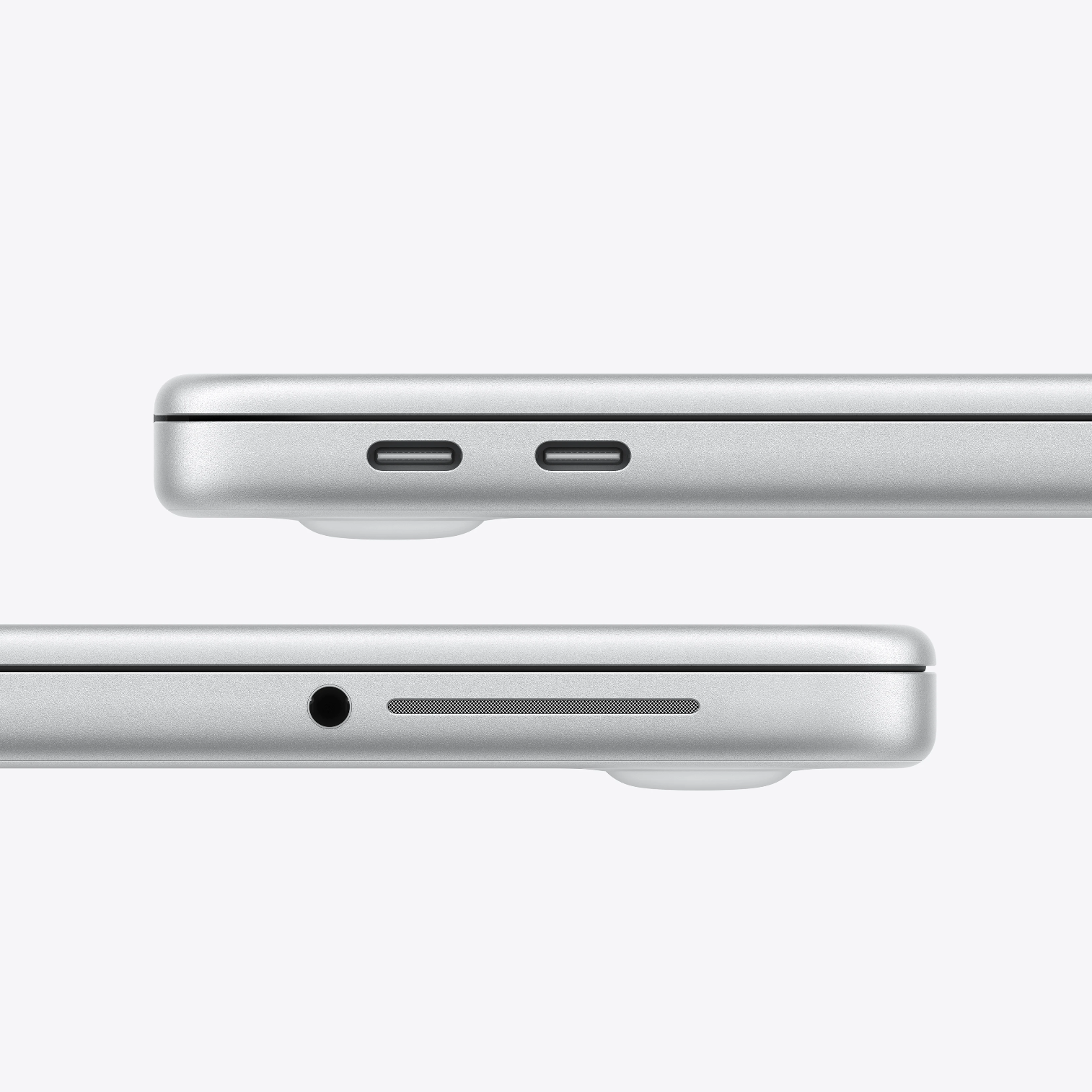
Ports are located on the left side of the device and include one USB-C port that supports 10 Gb/s transfer speeds, DisplayPort, and charging, alongside a second USB-C port limited to USB 2 transfer speeds and charging. Next to these is a 3.5 mm headphone jack, positioned beside one of the side-firing speakers.
To highlight how basic I am, I rarely, if ever, plug anything into my laptops. Only a couple times a year will you see me looking for a dongle to try to plug in a flash drive or SD card into my computer. So from a port situation, having only two USB-C and a 3.5mm jack, I think are fine. And when I look at my friends and colleagues, outside of charging their laptops and plugging in either a mouse or a USB stick, they're never using ports either.
This is one area where many budget laptops are actually more generous, often offering both USB-C and USB-A, and sometimes even adding in an SD card reader and HDMI port. So if those ports are essential to you, and you are firmly opposed to living the dongle life, the Neo may come up short.
Another mildly annoying choice Apple made is that only one of the USB-C ports supports fast 10 Gb/s transfer speeds, while the other crawls along at USB 2.0 speeds, topping out at 480 Mb/s. Those kinds of speeds reawaken a very specific, long-buried trauma: frantically trying to load a new playlist onto an iPod right before running out the door to catch the bus to school.
It is annoying that Apple did this. It feels unnecessarily miserly, and I suspect it is at least partly a limitation of the A18 Pro chip. In practice, though, I doubt most people will be burdened by it. At most, it may mean slower data transfers from time to time, and that some people will forget which of the two ports is the faster one or which supports an external display (i.e., the back one)
That said, the NEO also only support a single 4K display for external output. With the exception of one person I know who uses a dual display setup for work-related reasons, all of my friends and family are using the laptops either without a single display or with a sub-4k monitor as well. If you are a multi-monitor person, you’ll need to upgrade to an Air or Pro if you hope to power multiple displays.
Battery Life
Apple advertises that the MacBook Neo gets up to 16 hours of video streaming or 11 hours of wireless web browsing. As such, it currently has the worst battery life of any of Apple's laptops:
MacBook Neo: up to 16 hours video streaming, 11 hours wireless web. 
13-inch MacBook Air (M5): up to 18 hours video streaming, 15 hours wireless web. 
15-inch MacBook Air (M5): up to 18 hours video streaming, 15 hours wireless web. 
14-inch MacBook Pro (M5): up to 24 hours video streaming, 16 hours wireless web. 
14-inch MacBook Pro (M5 Pro): up to 22 hours video streaming, 14 hours wireless web. 
14-inch MacBook Pro (M5 Max): up to 20 hours video streaming, 13 hours wireless web. 
16-inch MacBook Pro (M5 Pro): up to 24 hours video streaming, 17 hours wireless web. 
16-inch MacBook Pro (M5 Max): up to 22 hours video streaming, 16 hours wireless web. 
It is not bad battery life, but it is noticeably worse in day-to-day use if you have spent time with the MacBook Air or MacBook Pro in recent years. For most people, it will still last a full day without needing a charge, but if you are using more performance-intensive applications or keep the display cranked to maximum brightness, the shorter battery life becomes more apparent. There is also no fast charging on the MacBook Neo. It tops out at around 24W, so when it does come time to recharge, it takes noticeably longer than some of Apple’s other laptops, reaching roughly 30% in 30 minutes compared with about 50% on the Air and Pro in the same span. Keep in mind that Apple ships the Neo with a 20W power adapter, so you’ll need to upgrade if you want the fastest possible charging. With the included brick, the laptop charges at roughly 15% every 30 minutes (source).
In my day-to-day use, which mostly consists of web browsing and writing, with some social media, image editing, email, calendar use, and music listening mixed in, the MacBook Neo can last me nearly two days without much trouble. The moment I start to stress the machine by running a lot of apps at once or leaning into more performance-heavy tasks or games, though, battery life drops quickly into the four-to-five-hour range. But for the basic types of things I demand of this device, the battery life is serviceable. I am rarely doing those heavier tasks far from a charger, but if you game more, edit more, prefer to keep the brightness cranked all the way up, or simply need a laptop that can reliably go long stretches without being plugged in, this is one area where the Neo may fall short.
8GB Ram
This might be the most controversial aspect of the MacBook Neo. Despite Apple insisting that “8GB on an M3 MacBook Pro is probably analogous to 16GB on other systems,” I still think it is a disappointingly low amount of memory for the kind of person likely to buy this device and keep it for the better part of half a decade, if not longer.
Apple is doing something to mask this limitation: it leans on swap memory. Think of regular memory as the money in your bank account, and swap memory as a line of credit. Once the money in your account is used up, you can begin borrowing beyond what you actually have. In this case, the Mac borrows that extra “memory” by using the SSD as pseudo-memory. It is essentially a safety net, but Apple relies on swap to help keep the device feeling usable in day-to-day operation. The tradeoff, of course, is that swap is slower than real memory, and can add undo SSD wear to your device over time.
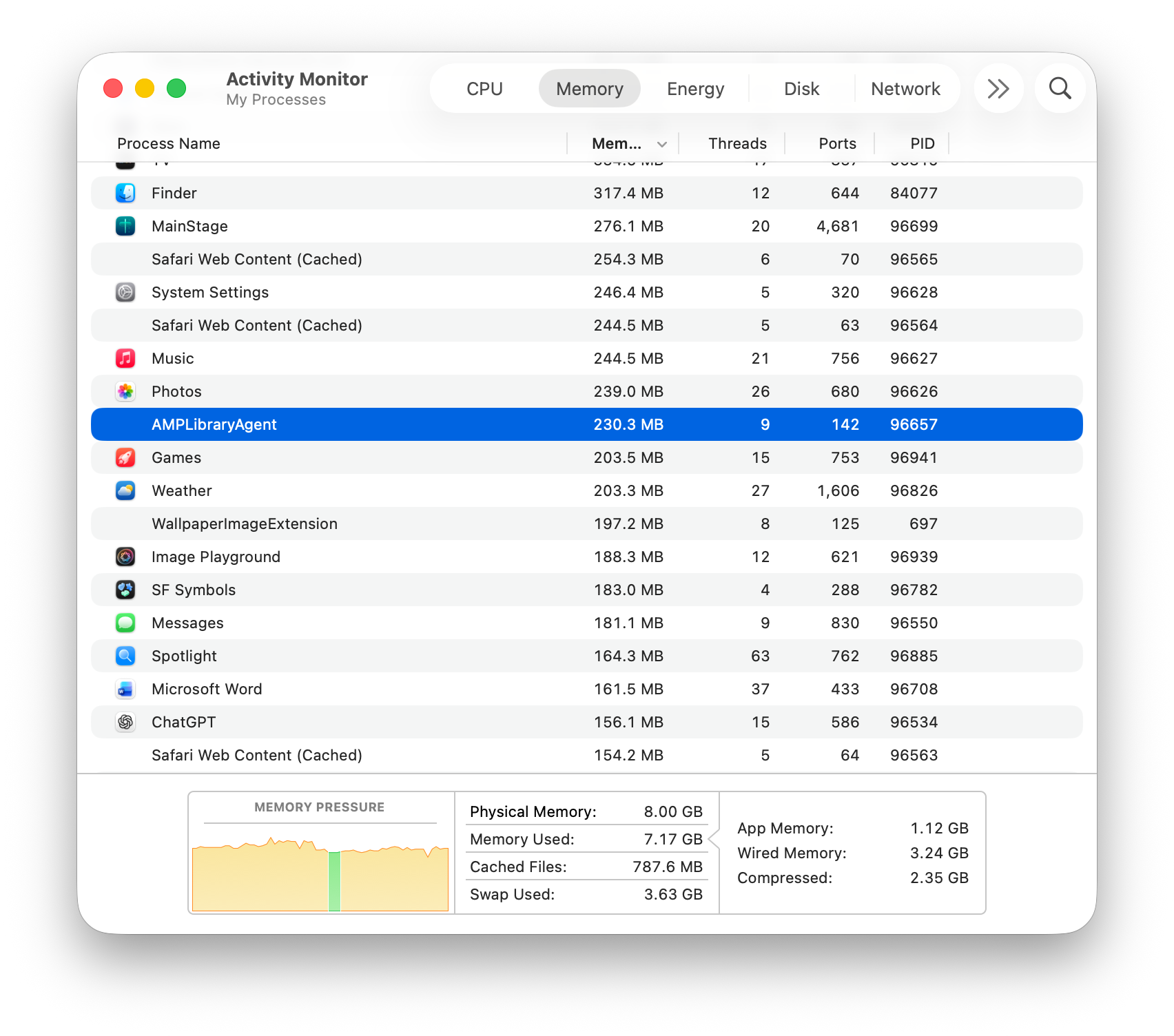
Opening 20-30 apps at once really taxed the machine and brought the system to a crawl. Treat the Neo as a 1-5 apps at a time machine.
Practically speaking, 8GB is enough for most people, and Apple does have technologies working in the background to help offset some of the headaches that come with running low on memory. Again, I think about how I used my laptop in college, and how my friends and family tend to use their budget laptops now: mostly basic apps, often doing one thing at a time. In those kinds of scenarios, 8GB is enough.
It also would not make much sense for Apple to put 16GB of RAM (not that I believe the A18 Pro even supports it) into a budget laptop when it knows that the vast majority of people shopping at this price point, and for this kind of product, can still have a perfectly satisfying experience with 8GB.
It still bugs me though...
A18 Pro
This is only the second Mac to run an A-series chip, if you count the A12Z used in the Developer Transition Kit during Apple’s move to Apple silicon back in 2020. Even so, it still kind of breaks my brain that a chip designed for last year’s iPhone is now powering a Mac. There is just something about that idea that feels mentally discordant.
I think part of that comes from a long-held assumption I had: that while an M-series chip could handle iOS with ease, an A-series chip would not be capable of doing the reverse and running macOS. I am not a heavy video, audio, or gaming user, so I am really talking about the everyday world of communication, productivity, and basic image editing. In that context, the A18 Pro has absolutely risen to the challenge, and other reviewers have show it capable enough for some gaming and 4K video editing. And moment I walk into an electronics store and start opening apps on similarly priced Windows machines, it becomes obvious that much Apple prioritizes speed, smoothness, and reliability of the OS, and how well the A18 Pro delivers on those qualities in a way much of the Windows ecosystem still does not.
That is not to say the A18 Pro is perfect. Apps and files can take longer to open, browser tabs will refresh more often, and rendering jobs will definitely take more time, but those differences are most noticeable only if you are coming from a higher-end Mac laptop. A month into using the Neo, much of that perceived slowdown has faded into the background and only really becomes obvious when I go back to one of Apple’s more powerful machines. That is partly because many everyday tasks lean heavily on single-core performance, and the A18 Pro is surprisingly strong there. Its Geekbench 6 single-core score of 3566 puts it in the same range as Apple’s M4 products, including the iMac, MacBook Air, and MacBook Pro, which sit around 3684, and even ahead of the M3 Ultra in single-core performance at 3212. It's really once you begin taxing multiple cores (more apps, more intensive workflows) that you'll hit the performance ceiling of the A18 Pro sooner.
Storage
I will primarily focus on the $599 MacBook Neo, which comes with a 256GB SSD. You can upgrade to a 512GB model, which also adds Touch ID, but it brings the price up to $699.
Personally, 256GB is not enough for me. It means most of my data, from documents to photos to music, has to live permanently in the cloud. That has not been ideal, and it has forced me to rely on fast Wi-Fi to constantly download, upload, and sync data on the Neo. If you have a lot of files, you may find this dependence on cloud services or external storage annoying.
But again, I know plenty of people who do not have large photo libraries, do not keep music or movies stored locally, and mainly use their devices to write documents, stream video, or browse the web. For that kind of user, 256GB is ample.
Sound
Despite my opinion that the side-firing speakers, those little 1-inch slits on either side of the Neo, look ridiculous, they pump out some pretty pretty audio. They support Dolby Atmos and their positioning helps give playback a wider, more spatial soundstage. They exceeded my expectations for what laptop speakers should deliver, and while they’re not as punchy as the speakers on the MacBook Pro, I do not think anyone was realistically expecting them to be.
Display
Pay mind that this is Apple’s smallest laptop display, so if you are used to something larger, it may feel a bit cramped. It is still a Retina display, so everything looks sharp and crisp, but Apple has clearly made a few compromises by omitting some display features. That said, I would argue most people either will not notice them or will not care.
For starters, the panel is IPS, so off-axis viewing angles are solid and colours remain reasonably consistent. But the Neo’s panel is not a P3 display, so if your work depends on seeing every last shade for something like colour grading, you may be in the tiny fraction of people for whom that actually matters. In everyday use, though, the display still looks vibrant, the colours are rich, and the backlight gets plenty bright. Honestly, if nobody had told me it was not a P3 display, I do not think I would have noticed.
And finally, there is no True Tone, so the display will not automatically shift warmer/cooler based on the ambient lighting around you. You can still manually warm things up with Night Shift, but it is another one of those features that, for most people, probably will not be a dealbreaker.
MacBook Neo Report Card
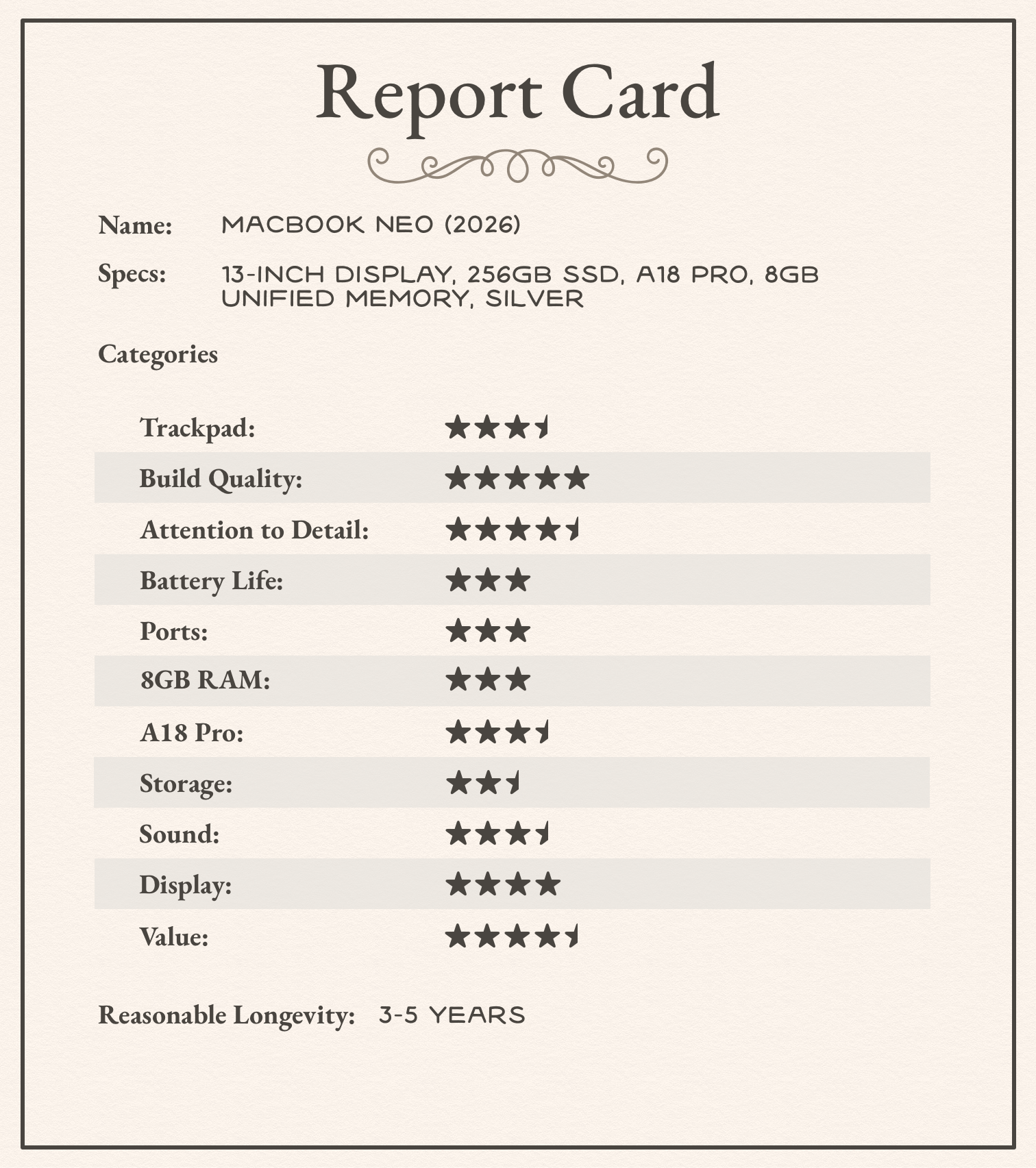
I’ve rambled long enough and here are my final report card of the 2026 MacBook Neo:
Value
This is Apple’s most affordable laptop to date, so any criticism has to be weighed against the value it delivers. At $599, you’re getting a laptop with best-in-class build quality, strong performance, acceptable battery life, and, most importantly, a smart set of compromises that make it the best-specced laptop for most people.
Neo is “new, exciting, original”

One of the cleverest things about the Neo’s release has been Apple’s marketing. This is not being positioned as Apple’s entry-level laptop, but as its most fun one. You can see that in everything from the TikTok campaign, to Lil Finder Guy, to the colour choices. All of this reflects a very deliberate effort to make the product feel hip to their target audience.
That matters, because when parents are buying a laptop for their kid, or when someone is buying their first laptop, the cheapest option is often the one they end up with not because they want to, but because they have to. That is not exactly an inspiring sales pitch.
Apple has cleverly changed that equation. Instead of feeling like the compromise option, the Neo is being framed as the fun, exciting option, which also happens to be the model a younger buyer is most likely to want and most likely to be able to afford.
Use

Neo & Lil Finder Guy out at a coffee shop to write this review
Like I’ve mentioned earlier, I’ve been using the MacBook Neo as my day-to-day machine for over a month now. I’ve used it to design projects in Pixelmator Pro, listen to music, watch content online, host Zoom meetings, respond to emails, and even write this entry. Apple’s A18 Pro has handled everything I’ve thrown at it, though admittedly I am a fairly light-to-moderate user.
The more your workload depends on larger, more memory-intensive apps running for sustained stretches, or if you juggle dozens of apps and have utilities running in the background, the more the compromises of a product like the Neo start to show. It can still do those tasks, and yes, it is capable of running apps like Final Cut Pro and Logic, but you are going to hit its quality-of-life ceiling much faster here. Things will slow down sooner, the battery will drain faster, tabs will refresh more often, and the beach ball will come to haunt you.
Using this product for the past month has also highlighted to me that I buy vastly over-performant machines for what I actually need. For the vast majority of people in the Mac community, or for those coming to the Mac for the first time and simply looking for a device to manage their day-to-day lives, this computer will be perfectly suitable for them.
In its current form, I think the Neo should remain a solid product for the next three to four years. Beyond that, though, I suspect the increasing demands of new operating system features, the wear on the SSD, and the overall pace of technological change will cause it to age a bit faster than something like the Air or Pro. It may still feel usable to the people who own it, but I can also see it becoming the kind of machine that is a bit more of a pain in the ass to use over time.
In Sum

Reflecting on the MacBook Neo, I’m reminded that we all have categories where we’re willing to spend more and categories where we naturally look for something more affordable. When it comes to computers, I’m usually happy to put more money toward better specs and a more capable machine. But with something like some household items, I’m likely to choose something reasonably generic & cheaper over any higher-end name brand options.
I think most people have those kinds of priorities, and that’s what makes the MacBook Neo such a compelling entry point into the Mac. It feels tailor-made for people who want a Mac, but who are either not in a position, or simply not interested, in paying premium prices products in Apple’s ecosystem.
And I think Apple’s real strength with the Neo is that it made the right compromises. The end result is a laptop that, in day-to-day use, functions on par with Apple’s higher-end machines. Most people buying the Neo will pay less, but they will not feel like they bought something lesser, and that, to me, is what makes the Neo Apple’s most important product of 2026.